Block 1.1 - Real numbers, Units and Axes
In this chapter we quickly go through the very core essentials of NxOgre (and that of Ogre and PhysX), it is likely you know this material already but it is worth having a glance through.
Real numbers
A real number is an integer (0, 1, 2, ...) or a fractional number (3.1, 3.14, 3.142, ...). It is similar to a Real Number in mathematics.
Due to the float point precision; NxOgre, PhysX and Ogre Real numbers are rational numbers so therefore has a limit in precision. However the loss of precision is only with numbers with a large number of significant figures, which are either to small or too large to make use of in a computerised Physics simulation.
NxOgre's Real (and Ogre's) is an alias of the C++ float data type. Although it can be changed to a double data type if PhysX is compiled with double precision. This is however only applicable to users with PhysX's source code, which is out of reach for most users.
namespace NxOgre
{
        typedef float Real;
}
NxOgre's Real, Ogre's Real or PhysX's NxReal are the same data type, therefore interchangeable and does not require any conversion function or code.
Ogre::Real m = 50.0f;
NxReal t = 25.0f;
NxOgre::Real F = m * t;
Dimensions
A dimension is an extension of space in a given direction. Although it could be seen as the minimium amount of coordinates required to describe the location of a shape with in it. One dimensional space, requires one coordinate. Two dimensional space; two, and three dimensional space - our space, requires three dimensions.
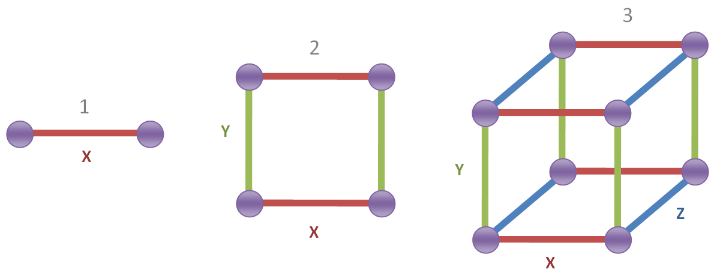
Each dimension has a name; 1st is called X, 2nd is called Y and the 3rd is Z and they are perpendicular to each other. In NxOgre and PhysX; X is typically coloured in red, Y in green and Z in blue.
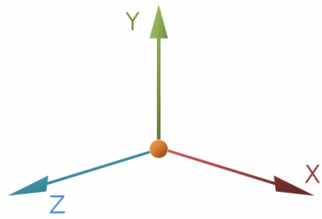
As we exist in three dimensions, so does NxOgre and PhysX. Although with some extra code, the third dimension Z can be ignored, more or less making the world act as a two dimensional space. Even further code can be added to behave in a single dimension, if you so wish.
Normally in NxOgre, Gravity is applied in the Y direction (-9.8 m/s), so Y is considered "up". NxOgre also follows Ogre's tradition of treating -Z as "forward", although this isn't enforced.
If the concept of living in different dimensions peaks your interest, then you should have a read of Flatland - A Romance of Many Dimensions by Edwin A. Abbot, a short Victorian narrative of beings living in a two dimensional world.
Weights and Measures
To provide a common way of comparing how far away is something, or how large is this, or how long does that take to complete, we use a system of agreed units. Most countries use the metric system, metres (meters) and kilograms, and everyone uses seconds to measure time. If your in a country that uses the imperial system (inches/feet and pounds), then you may not be completely familar with it.
For a frame of reference a meter is just under half the height of an average interior door, and two pounds of sugar is about a kilogram, and it is highly probable you've already seen road signs measured in kilometers already.
The modern form of the metric system is the International System of Units or SI was agreed upon many years ago. It is commonly used in scientific communities, and if not nearly all of the countries in the world.
As, you've probably guessed by now NxOgre uses the SI system for measurement. It only requires the metre-kilogram-second base units, as the other units of electric current, temperature, luminous intensity and amount of substances are sadly not used by features of PhysX.
| Name | Symbol | Quantity |
|---|---|---|
| metre (meter) | m | Length or Distance |
| kilogram | kg | Mass |
| second | s | Time |
Unfortunately, due to the nature of the C++ syntax, it isn't possible to give Real numbers units naturally as we do in the real world.
Real distance = 5.0 m/s * 2.0 s;
Substitutions could be used, but are hardly practical for an end-user to use.
Real distance = metres_per_second(5.0) * seconds(2.0);
Instead NxOgre, just assumes your length units are in meters, your masses are in kilograms and your time is measured in seconds.
Real distance = 5.0 * 2.0;